Upon completion of Step 2 you will arrive at the Order Summary Screen – this effectively completes the order entry process. IPPG will review the order and call if there are any questions before processing the order.
Review and Edit the Order as Needed
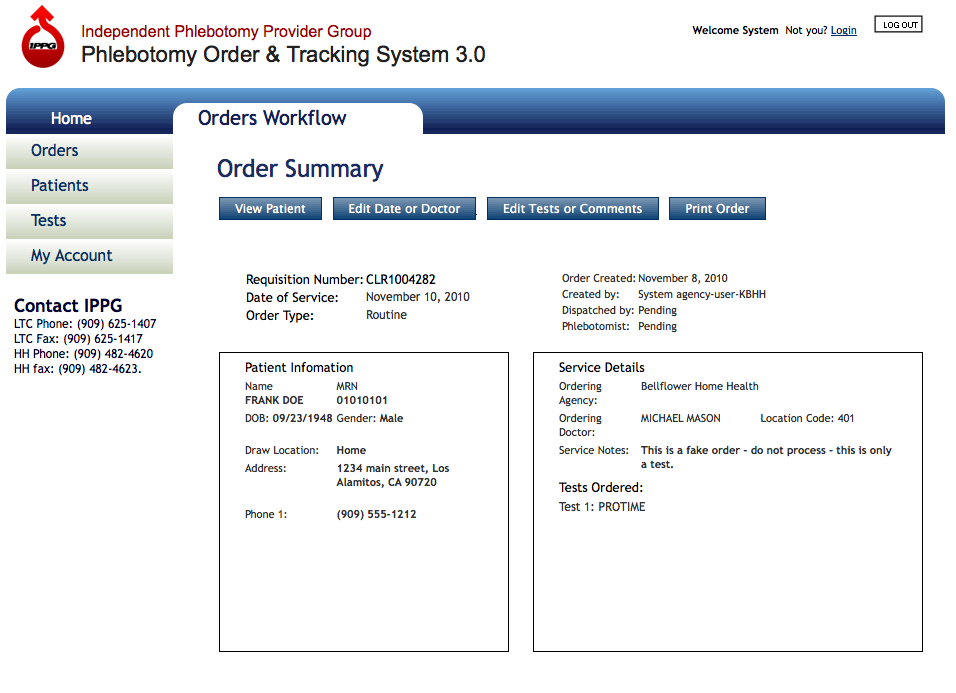
Order Summary Screen - the order has been successfully entered into the system for processing
- Review the Order Summary. At this point to order has been successfully entered into the system for processing.
- If there are changes necessary choose from the buttons at the top of the screen:
View Patient, Edit Date of Service or Doctor, Edit Tests or Comments or Print the Order - If the Order is within 24 hours or less of the date of service, Editing the order requires a phone call to IPPG